
Loading the creation workspace…
Free AI Image Enhancer & Image Upscaler
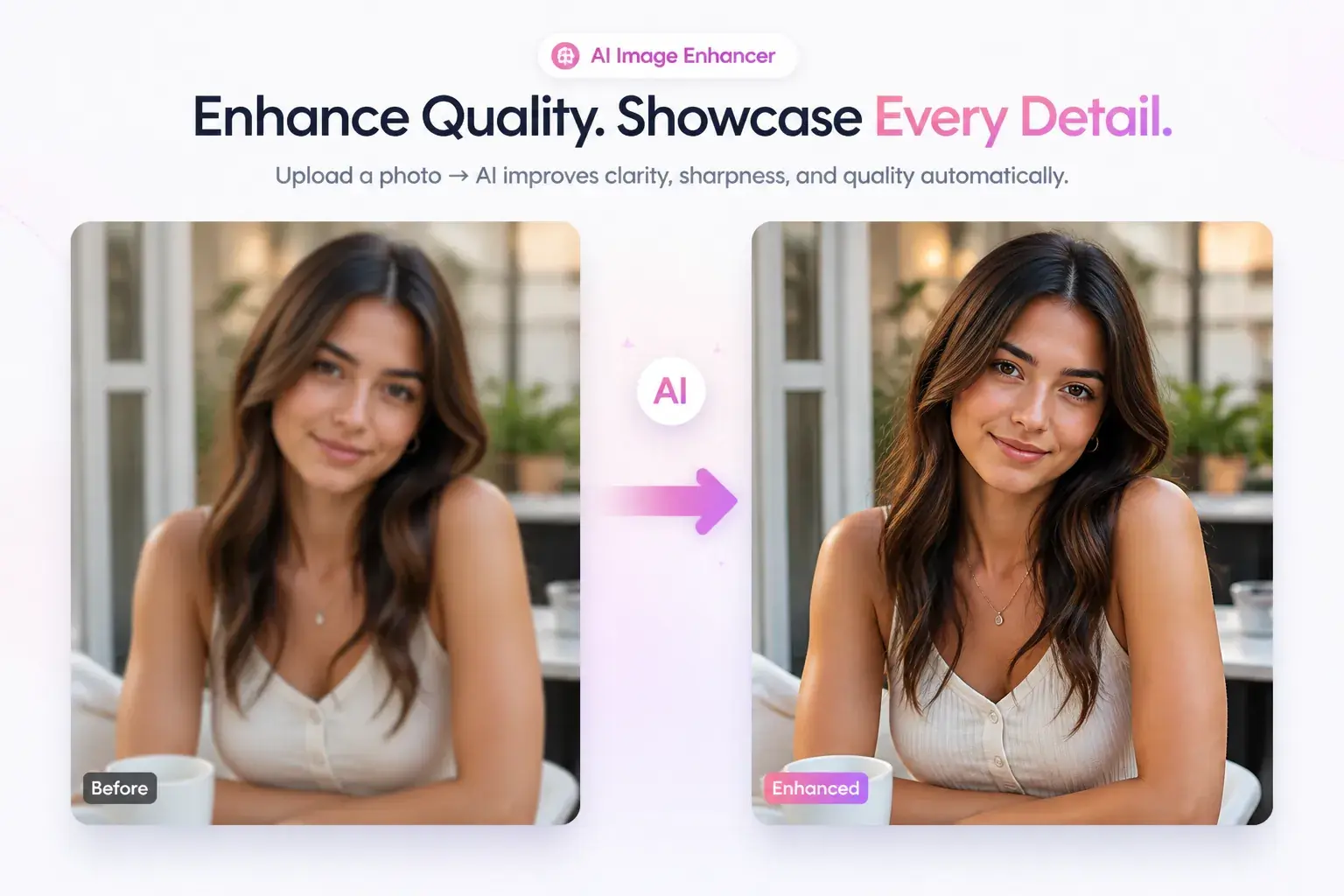
Enhance blurry photos, sharpen details, and upscale images online with AI. Turn low-quality images into clearer, higher-resolution photos in seconds.
How to Enhance Image Quality with AI
Enhancing your image takes only 3 steps:
Step 1 - Upload Your Image
Upload the blurry, low-resolution, or unclear photo you want to improve.
Step 2 - Let AI Enhance It
AI automatically analyzes the image, sharpens details, improves clarity, and upscales the resolution.
Step 3 - Preview & Download
Compare the enhanced result and download your improved image when you're satisfied.
What Is an AI Image Enhancer?
An AI Image Enhancer is an online tool that automatically improves the quality of your photos. It can make blurry or low-resolution images clearer, sharpen details, and increase image resolution while keeping the photo looking natural. With AIKissfiy, simply upload an image and let AI handle the enhancement. You can improve image quality online without manually adjusting sharpness, resolution, or other complex settings.
Why Choose AIKissfiy's AI Image Enhancer?
Easy to Use
Upload your image and enhance it without complicated editing tools or settings.
AI-Powered Enhancement
Let AI automatically improve image clarity, details, and overall visual quality.
Fast Online Processing
Enhance and upscale images directly online without installing additional software.
Works with Different Photos
Improve portraits, everyday photos, social images, product photos, and more.
No Editing Skills Needed
Get better-looking images without learning professional photo editing software.
Free to Start
Try the AI image enhancer with available free credits before choosing additional options.
Ways to Use the AI Image Enhancer
Make Blurry Photos Clearer
Turn soft or blurry photos into clearer images with sharper details and better visual definition. It is an easy way to improve photos that look slightly out of focus or lack clarity.
Upscale Low-Resolution Images
Increase the resolution of small or low-quality photos and create larger, clearer versions. Use the AI image upscaler when you need higher-resolution images for viewing, sharing, or other creative projects.
Bring Out More Image Detail
Improve faces, textures, edges, and other fine details that may be difficult to see in the original photo. AI enhancement helps create a cleaner and more polished result without complicated manual editing.
Explore More
Continue creating and editing your photos with AIKissfiy. Improve image quality, adjust backgrounds, or create entirely new looks with AI.
Turn Blurry Photos Into Clearer Images
Upload your image and let AIKissfiy enhance details, sharpen your photo, and upscale its resolution in seconds.
Start for Free
What Users Like About AI Image Enhancement
The image was noticeably clearer after enhancement, and I didn't have to adjust any settings myself.

Emily R.
I had a small low-resolution photo that looked much better after upscaling. The whole process was really simple.

Daniel M.
I mainly use it for blurry photos. Uploading and getting an improved version only takes a few steps.

Jessica T.
I like that I don't need Photoshop or any editing experience. I just upload the image and let the tool do the work.
Michael K.
The enhanced photo kept a natural look instead of becoming overly sharp or artificial.

Sophia L.
I use it before sharing photos online when the original image is too small or unclear. It's quick and convenient.
Ryan C.
Frequently Asked Questions About AI Image Enhancer
An AI Image Enhancer uses artificial intelligence to improve image clarity, details, sharpness, and resolution automatically.
Upload your blurry photo to AIKissfiy. AI analyzes the image and improves visible details and clarity automatically.
Yes. Upload a low-resolution image and use the AI image upscaler to create a larger, higher-resolution version online.
If the original image and enhancement option support it, you can use the image upscaler to increase the photo toward a higher-resolution 4K output.
The tool creates an enhanced version of your uploaded image. Your original image can remain unchanged while you preview and download the improved result.
You can enhance portraits, old photos, social media images, product photos, lifestyle photos, and many other common image types.
You can start with available free credits on AIKissfiy. Additional generations and premium features are available with paid options.
No. The AI handles the enhancement automatically, so you don't need Photoshop or professional photo editing experience.